
Have you ever wondered how to create a gift guide for your blog?
Perhaps you’ve seen a gift guide template and wondered how to create one in Canva.
You are not alone. With various holidays around the corner, people are seeking a curated list of beautiful gift ideas for their loved ones.
Also, creating and sharing gift guides is a great way to make passive income through affiliate marketing.
This involves curating a list of products you love and recommend, and earning a commission when someone purchases any of those products using your referral link.
So, if you want to learn how to create a holiday gift guide or an evergreen gift guide for your blog to generate income, stick around.
In this blog post, I will guide you through everything you need to know about creating a gift guide in Canva, including how to create a gift guide for your blog and even how to create gift guides to share on your Instagram.
However, if you don’t want to go through the lengthy process of designing a gift guide yourself, I have some gift guide templates available for download.
Note: This post may contain affiliate links, and I will earn a commission which I use in running this blog if you purchase using my link. This won’t attract an extra cost to you. Read my Disclaimer policy here.
What is a Gift Guide
A gift guide is a curated list of fantastic gift ideas and product recommendations to help shoppers make a buying decision.
Gift guides are a great way to help your readers or audience save time and have a handy list of resources they can buy.
It could be a curated list of holiday gift guides such as Christmas gift ideas and new Year gift ideas.
Or seasonal gift guides, such as Valentine’s Day gift ideas for him, gift ideas for her, Mother’s Day gift ideas, Father’s Day gift ideas, graduation gift ideas, etc.
Nowadays, people even curate gift guides for entrepreneurs, gifts for bloggers, and gift guides for specific niches (e.g., gift guides for mom bloggers).
Additionally, if you are a blogger, creating a gift guide on your blog can be a great way to serve your audience while making affiliate sales and passive income.
Creating a blog gift guide is a common practice among bloggers, particularly in lifestyle niches.
Bloggers create various types of gift guides tailored to their blog niches. An example of a curated gift guide on a blog is Bustle’s 25 Self-Care Gift Ideas blog post.
Why You Should Create a Blog Gift Guide
1. Gift Guides Help You Connect With Your Audience
One way to build a genuine connection with your audience is by meeting your readers at the point of their needs.
Sharing a list of curated gift ideas that you use as a blogger or that can help solve a problem will help build trust.
Gift guides help you recommend helpful products, resources, and tools to your audience.
For example, I have a blog post featuring a curated list of gifts that any blogger will appreciate.
2. Opportunity to make money with affiliate Products
Gift guides are an excellent way to sell more affiliate products and generate passive income as a blogger or influencer.
It could be a gift guide on Instagram or a blog gift guide. It doesn’t matter.
Additionally, during the holiday season, shoppers are actively seeking gift guides to inform and enhance their purchasing decisions.
So, you have opportunities to sell affiliate products while recommending all the beautiful things you love.
Your gift guide can be a simple checklist of resources for planning a family camping activity.
3 | Gives your Brand More Exposure:
For instance – Pinterest loves seasonal content so much, especially if you are in the lifestyle niche.
If you create a gift guide and post them on Pinterest a few months before the holiday season, you have a chance of going viral. This means more traffic, more exposure, and more money.
Curating a list of Gift guides is a great way to increase your brand visibility and get more of your ideal clients onto your site.
A gift guide helps build and create brand awareness, especially during the Holiday season. It influences shoppers’ decisions.
4 | Boost sales of your products
As a blogger and business owner, you have the chance to have your products featured in other bloggers’ and creators’ gift guides.
Featuring in the gift guides of other bloggers, influencers, and creators will give you exposure and possible chances of selling more of your products, especially if you have an affiliate program.
I have a list of gifts for bloggers, especially newbie bloggers, and most products and courses I have in my gift guide list are products from other bloggers and creators.
Now you know you should create a gift guide for your blog, let’s review some live examples of gift guides.
Do Note: A gift guide could be a Holiday gift guide (seasonal gift guide) or an evergreen gift guide.
Some Gift Guide Examples
Have you ever bought products you see on a blog or Instagram just because your favourite blogger or influencer you follow and trust their choices recommended them?
However, this illustrates that we come across gift guides and product recommendations daily, including simple rewardStyle pages you click on with many products.
So, without ado, this is a list of some gift guides examples;
1| Mother’s Day Gift Guide
A mothers day gift guide involves curating and recommending products and gifts suitable for mothers.
A case study by Bindy shows massive shopping trends and shoppers’ habits.
So, if you are in the lifestyle niche or mom blogging niche, consider creating a gift guide for Mother’s Day. A perfect example is a Mother’s Day gift guide from With Houna.
2. A Gift Guide for Bloggers
Another perfect example is a gift guide for bloggers.
And it involves curating a list of resources and tools a blogger uses to carry out the day-to-day operation of their business. It could be something as little as a Blog planner or a notepad.
For Example, this is a gift guide containing gifts for bloggers, especially beginner bloggers.
Additionally, you can decide to niche down and curate a gift guide for specific audiences, such as self-care bloggers, mom bloggers, travel bloggers, etc.
The more you niche down when creating a gift guide for your blog, the easier it is to make targeted sales.
3 | Personal Development Gift Guides
The personal development niche is vast, and curating a gift guide for personal development is a fantastic idea, ranging from journaling gifts to a list of personal development gifts.
Inside of Happiness Blog has the perfect personal development Gift Guide example.
4 | Travel Gift Guides for Travel or Outdoor Enthusiasts
One crucial aspect of curating gift ideas is meeting your audience at the point where their needs intersect.
A travel gift guide will bring you affiliate income by promoting Amazon products if you are in the travel niche.
Chelsey Explores Gift Guide for Outdoorsy Women is a great gift guide example for the travel niche.
There are endless gift guide examples, and I could write a whole blog post about it, but I believe you’ve already got the picture.
However, when creating a list of gift guides for your blog, product catalog, or gift guide in PDF format.
Always ensure your gift guide is related to your blog niche and meets your audience at the point of their need.
9 Things You Need to Create an Effective Gift Guide for Your Blog
1 | Know Who Your Gift Guide is for (Be Specific)
There is this famous saying, “the riches in the niches .”When creating a gift guide for your blog or a Holiday gift guide on Instagram or any social space.
Keep in mind who you are curating your gift guide for, and be specific.
For example: Let’s assume you are curating a Holiday gift guide for Christmas.
Don’t go about picking products related to Christmas without considering whether it’s for him, her, a mom, a Christian mom, or a blogger.
When planning your gift guide, determine who your gift guide is for and set a price benchmark for each gift before selecting products to include.
For example, you can plan your gift guide this way: Create a gift guide, Ideas under $50 for Solo Female Travellers.
This is highly specific and tailored to a particular audience, addressing a defined problem and including a budget.
2. Decide on a Theme for Your Gift Guide
If you are creating a Seasonal or Holiday Gift Guide, such as a Valentine’s Day gift guide or a Christmas gift guide, you know your theme and what type of product to curate.
This is an important step, and you cannot skip it. These categories of gift guides are time-sensitive, and you need to plan it all out and post them on your blog ahead of time.
Although if your gift guide is evergreen, like for special occasions such as graduation gift ideas, baby shower gift ideas, wedding gift ideas, bridal shower gift ideas, new house, gifts for bloggers, etc.
You can post the evergreen gift guide ideas at any time on your blog.
When planning and creating a gift guide for your blog, the theme of your gift guide is essential.
3. Choose Your Gift Guide Format
When it comes to product recommendations, that’s what a gift guide is all about.
You have several options for presenting, formatting, and promoting your gift guide. You need to decide on your gift guide layout.
Commonly “used” Gift Guides ideas format includes;
A Gift Guide in a Blog Post Format: This is one of the most commonly used gift guide formats, where a blogger recommends multiple gifts within a single blog post. A clear example is this list of Practical gifts for bloggers.
Instagram Gift Guides: Successful Instagram influencers earn a significant amount of money from product recommendations, such as ‘Valentine’s Day Ideas’.
When these influencers recommend products, they are either affiliated with or have a sponsored post deal.
If you have an engaged audience on Instagram, consider recommending products.
A Dedicated Page on the Blog: This is not a gift guide per se, but it can technically be regarded as one because it’s a collection of product recommendations.
Most bloggers refer to it as a Resource Library, Tools of the Trade, “Tools I swear by,” or Recommended pages.
However, a resource library is excellent for generating affiliate income, and if you want to increase your affiliate income with your blog, consider creating this page.
Bluchic has beautiful, ready-made product recommendation templates to pick from.
A PDF Gift Guide with Products You Recommend: You can create a guide in Canva with Products and affiliate links, and give your readers access to download it.
Email List Gift Guides: Another way to curate and promote a list of products you love is through your email list.
This is a surefire way to engage an audience. Although you need to be careful because not all companies allow this. For example – Amazon
4. Decide How Many Products You’ll Feature in Your Guide
After choosing a gift guide format, you should consider the number of products you want to feature in your Gift guide.
If you are creating a PDF Gift Guide or a reward-style gift guide, keep the number of products between 8 and 12.
You don’t want to overwhelm your readers and leave them indecisive.
Although if you are creating a gift guide for your blog, you can use your discretion.
I have seen gift guides on blogs with between 10 and 100 product recommendations.
5. Product Links or Affiliate Links
When creating a gift guide for your blog, a gift guide in PDF or any format, you need links to the products.
While many brands don’t have issues with you recommending or speaking positively about their products.
You can quickly grab a link from their website and add it to your gift guide, and they will be happy you did.
However, you don’t want to just grab a product link if you want to make affiliate income using your gift guide.
Instead of a standard product link, add your affiliate link.
For example, I use Canva Pro to create graphics for my business, and if I want to write about Canva, I will use my Canva Pro Affiliate link instead of the regular link.
I can make money by telling my audience that I use Canva Pro to create beautiful graphics. While that is the truth, I will still make money from it.
So you need to become an affiliate for the brands that you’ll include their products in their gift.
If you’re a new blogger, consider reaching out to these brands or Researching their affiliate programs through Google.
For example, “Brand Name Affiliate Program,” and if that brand has an affiliate program, you’ll find it on Google.
Or, search for Google gift guides in your niche and see the products that other bloggers promote.
One of the most common affiliate networks bloggers join is Amazon Associates.
Although Amazon’s affiliate commission is pretty tiny.
However, you have a higher chance of selling a lot of products, as Amazon deals with products we use in our day-to-day activities.
You can join extensive affiliate networks, such as ShareASale, Impact Radius, Commission Junction, and Reward Style, among others.
Although joining an affiliate program can be intimidating if you’re a newbie with little traffic. However, most brands happily welcome all categories of bloggers.
You can also partner with bloggers in your niche who have digital products such as printables, courses, and programs, and become an affiliate.
6. Find Product Photos For Your Gift Guides
When creating a gift guide, you want to use high-resolution product images.
However, visiting a website to download a product image, even if you are an affiliate, can be considered copyright infringement.
The best way to procure product images for your gift guide is to reach out to the brand’s support and inquire about obtaining images for product promotions.
The Good news is that most brands have resources, images, and swipe copies that affiliates can use.
At least, I know Ultimate Bundles provides its affiliates with all these.
Some products, however, don’t require product images to promote them. For example, I don’t need an image to promote a Blog Hosting Company.
Don’t forget to read an Affiliate company’s Terms and Conditions.
7. You Need an Affiliate Disclaimer
An affiliate disclaimer is a few-sentence legal statement you must include whenever or wherever you promote an affiliate product. This is a Law by the FTC to protect consumers.
Therefore, you should include your affiliate link immediately before adding an affiliate product link.
Your affiliate disclosure should be placed at the top of your blog gift guide post. And for a PDF gift guide, right after your intro.
This may seem intimidating if you’re new to blogging or gift guide recommendations, but it’s not.
I grab all my legal templates, Aself Guru’s legal template Store owned by Amira Irfan, who also doubles as an attorney and blogger.
8. Choose a Banging Gift Guide Headline
When creating titles for our products, gift guides, or blog posts, we often treat crafting a good headline as less essential.
Your gift guide title matters a lot. Because many bloggers and influencers are promoting something similar, if not the same product.
And because cookie periods matter a lot in affiliate marketing.
In some affiliate programs, affiliate sales are awarded to the person whose link was clicked first.
Even though the buyer made the purchase decision after reading another blog post and clicking on that link.
Craft no-brainer titles for your gift guides and give your readers something to look forward to.
For example, instead of writing 30 gift ideas for bloggers, try using 30 Insane Gift Ideas for Bloggers – (Serious Bloggers Only). The “serious bloggers only” is a subline.
Another example is – “40 Exciting Graduation Gifts Ideas under $50 for College Students”.
I’m not an expert at crafting titles. This title is better than 40 Graduation Gift Ideas for College Students.
While this gift guide preparation checklist may look daunting, it will help you learn how to create a gift guide for your blog.
You can use a simple tracker, checklist, notebook, journal, or tracker to plan your gift guide.
How To Create A Gift Guide For Your blog
There are three ways to create a gift guide as a blogger. The first option is to create a gift guide blog post.
This involves writing a gift guide blog post that describes and recommends various products, including their uses, your affiliate links, and your opinion if you have personally used these products in the past.
Another method of adding a gift guide to your blog is to create a product recommendation page using a landing page, like a blog resources page.
Or you can link your Liketoknowit page as a gift guide Page, just like Withhouna did, and add this page to your top bar where your readers can see it.
The next best option is to create a downloadable PDF gift guide in Canva, including your product images, affiliate links, and other relevant details.
So, in the next few minutes, I will show you how to create a gift guide from Scratch in Canva.
However, if you prefer to use a gift guide template as a time-saver, I have created beautiful gift guide templates you can easily customize for free.
How to Create a Gift Guide in Canva
In the following steps, we will guide you through the process of creating a simple gift guide in Canva.
Step 1. Choose Your Gift Guide Layout/ Dimension
The first step when creating a design in Canva is to choose a document size.
You can use an existing document size or create a custom document size.
It could be US letter size, A4, presentation slides, Instagram post, and Instagram stories document size.
But, for this blog post, we want to create a PDF Gift Guide, so choose US letter or A4 document size.
To choose the document type in Canva.
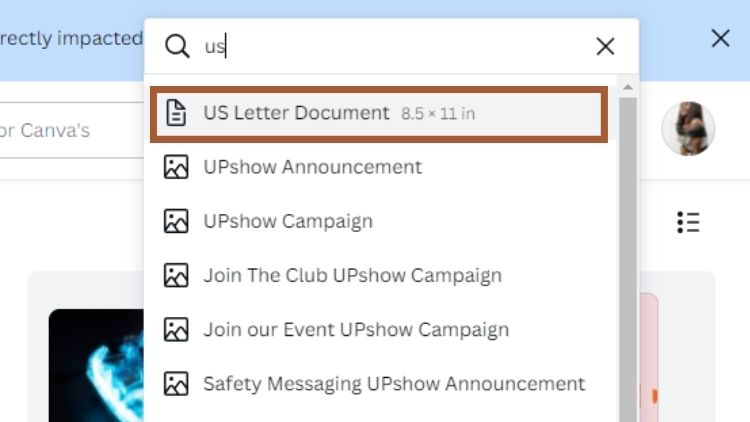
Go to Canva home, click on create a design, type in US Letter in the search bar, select US Letter document, and a blank page will open.
Step 2. Upload Your Gift Guide Product Images on Canva
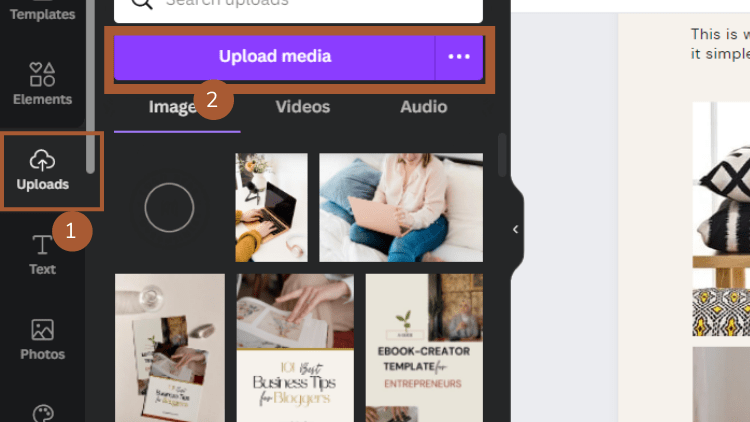
Navigate to the left-side tools editor, where you can find templates, elements, uploads, and text.
Click on “Upload” and upload all images you procure for your gift guide.
And once you upload them to Canva.
Again, navigate to the left-side tool editor in Canva, click on “Elements,” scroll down until you find the “Grid” elements, and click on the square-shaped grid.
Adjust the grid frame size until you find the perfect size for the images you want to use in your Gift guide.
Please note that using the frame is not compulsory. I recommend using a frame so you can turn your gift guide design in Canva into a reusable gift guide template.
And next time, when you want to create a gift guide, all you need to do is plug and play.

Also, note that when creating a gift guide for Social media, such as Pinterest or Instagram, etc.
You may want to make your image background Transparent, i.e., remove the image’s background. I wrote a guide on removing the background from an image in Canva.
Step 4. Layout Your Images and Create Your Gift Guide Layout
The layout and design of your gift guide depend on you and the number of products you want to promote.
You can choose your gift guide layout using different layout formats.
6 products using a 3×2 gift guide layout Formats

9 Products using a 3×3 Gift Guide layout format
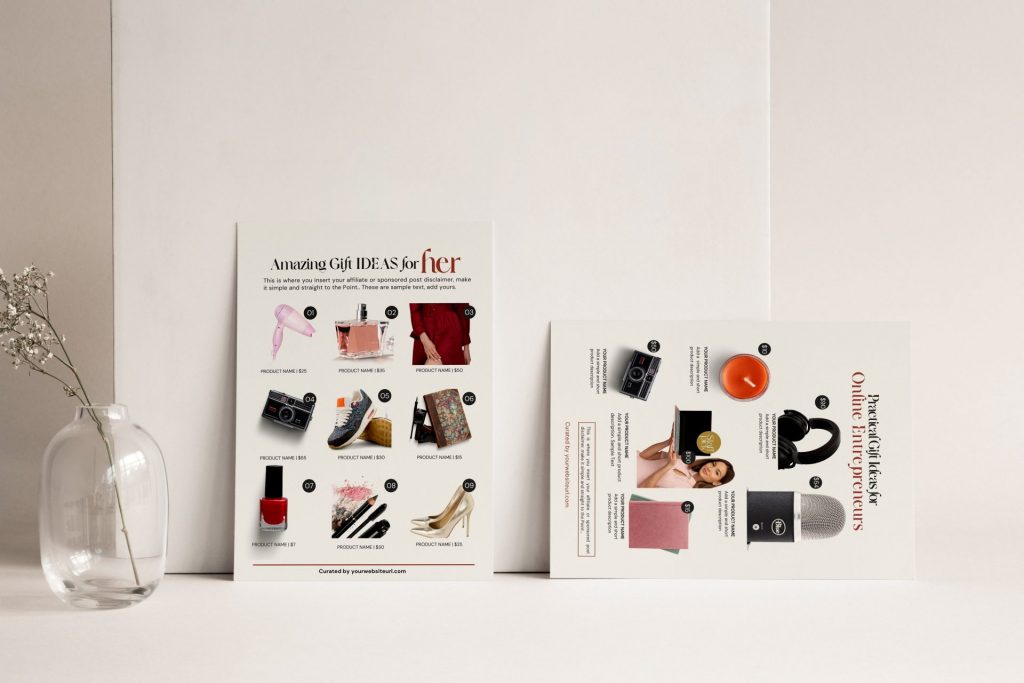
Gift guide layouts images with no background
Gift guide with just texts and no images – This gift guide style works when you promote things like hosting for websites, software, and tools.
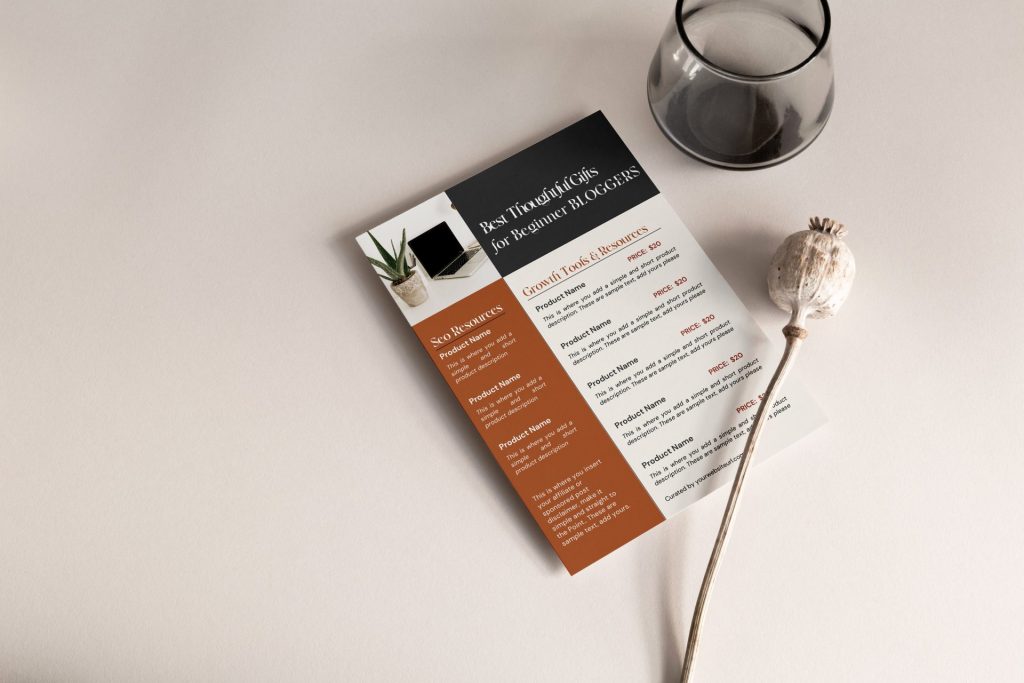
But if you are promoting household items and products, consider using images.
I believe you get the picture I’m painting on laying out your gift guide.
Step 5. Add Product Prices and Description
The next step is to add the product title and description (product description is optional). Also include the prices of each item.
Including the prices of the products in your gift guide helps your readers make informed buying decisions more quickly.
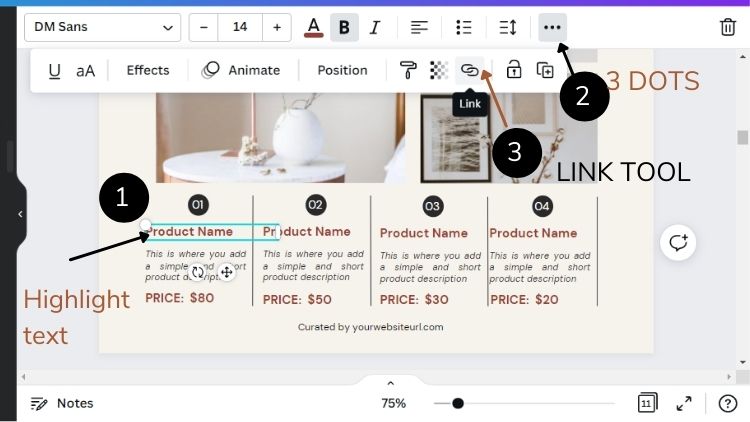
Step 6. Add Affiliate Links for Each Product
You can include your product affiliate using different methods.
Add product links to the product description or title as hyperlinks.
This way, when someone clicks on the product title or description, they will be redirected to the product page, where they can make a purchase.
Alternatively, you can add product links to the product images, and when someone clicks on them, they will be redirected to the corresponding product page.
A QUICK TIP: When adding hyperlinks to your gift guide, I prefer hyperlinking both the image and product title, as you don’t know which one your subscriber will click on.
Also, note that hyperlinks do not work on gift guides in Social media formats, e.g., Instagram posts. Your product images or hyperlink will not be clickable.
You’ve to share your links in your social media description or create a PDF gift guide and direct users to download it.
Step 7. Add Your Gift Guide Title and Affiliate Disclaimer
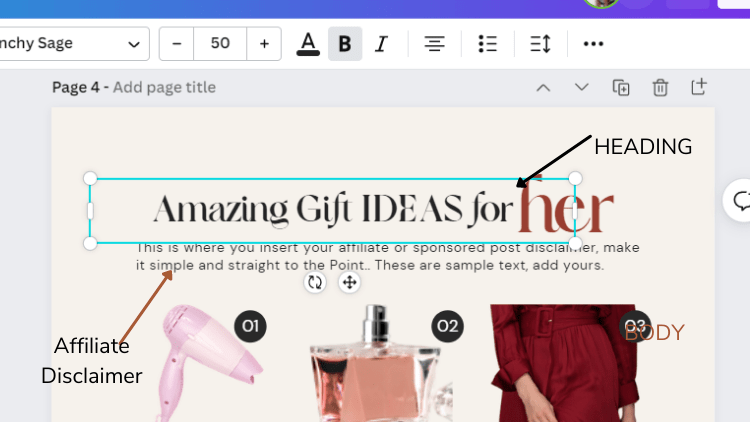
Most people add their gift guide title before they lay out images. So, if you are one of them, you should have your title in place.
To add text on Canva, hit the “T” button on your keyboard and add your gift guide title.
Don’t forget to increase the font size. Play around with fonts until you create a title that suits your design.
Add your affiliate disclaimer – You can add your affiliate disclaimer directly under your Gift Guide heading (Title), at the bottom, or at any other spot in your guide.
However, ensure to write your affiliate disclaimer using a readable font and font size.
When you were researching how to create a gift guide for your blog, you may not have expected that. I’d recommend you have a disclaimer.
Note: I’m not a lawyer, and this is not legal advice. However, a disclaimer for your gift guide is essential.
Step 8. Download your Gift Guide
Wrapping up on creating a gift guide in Canva – the final step is to download your gift as a high-quality PDF (PDF Print) in Canva.
To download your gift guide in Canva, navigate to and click the “Share” button at the top right of the bar, and a new window will open.
Scroll down and click on “download” and File type, set to PDF (PDF Print).
Now, click the download button, and your gift guide will be sent directly to your Computer.

Pro Tips for creating a Gift Guide for your blog
1. Procuring Product Images:
Avoid downloading images from a website. They are copyrighted.
If you don’t know how to get images to promote a product.
Reach out to the brand’s support, and they will provide guidance on how to obtain product images.
2. Add Your Affiliate Link as a No-follow link:
Google’s policy is that affiliate links and sponsored posts should be tagged as no-follow.
I recommend using the Pretty Link plugin to correctly add and tag an affiliate link.
3. Do Not Copy Product Descriptions
Avoid copying product descriptions from a website. This could put you at risk of copyright infringement.
Create your product description or contact their support. Some brands create numerous resources for their affiliates.
4. Amazon Product Links
Amazon does not permit offline promotions, such as email marketing. Avoid promoting Amazon links directly in an email (this policy changed recently.)
However, you can promote your blog post or resource pages containing Amazon affiliate links in your Email.
So when your readers click on the link, they will be redirected to your blog page where you shared Amazon products.
This same strategy works exceptionally well when creating a PDF gift guide featuring Amazon products.
I also recommend that you read Amazon’s Terms and Conditions and ask their support questions where you don’t understand.
Exhausting Sighs! That’s a long post right there.
Finally, I would love to see your gift guides. Do you have a gift guide on your blog? Or are you considering creating one right now?
Which gift guide method works best for you? Do let me know in the comments.